



Community Software Migration Guide
A project framework for planning, validating, and executing a migration
Community migrations are rarely a welcome project.
They’re disruptive, resource-heavy, and put years of investment under pressure. Between complex integrations, massive datasets, and an active member base that expects continuity, the prospect of moving everything can feel overwhelming.
Complexity, however, doesn’t have to mean chaos. Having guided hundreds of migrations, we’ve seen what makes the difference: careful planning, the right sequencing, and practices that keep both data and the member experience intact. Those lessons have shaped a framework that community teams can use to bring structure to the process.
This guide walks through that framework. It’s designed to give you a clear understanding of the stages of a migration and the priorities to focus on in each.
We’ll cover:
- Stages of a typical community migration
- Challenges to prepare for
- Steps to take by stage
Stages of a Community Migration
Every migration follows a series of predictable stages. Here, we’ll provide a high-level roadmap explaining what happens in each stage.
Stage 1: Pre-Platform Selection
In the first stage, shape your migration plan by realigning community goals with organizational priorities. This ensures the migration direction reflects current company goals, rather than outdated KPIs, before you choose a new platform. You may also want to audit your community to get a clear sense of the scope and structure of the migration ahead.
At this stage, if you’re definitely planning to migrate, early communication with members helps build trust and goodwill. Sharing a clear, member-focused vision for the future frames the change as progress rather than disruption.
Key actions:
Align
- 1) Meet with internal stakeholders to understand their organizational priorities and
how the community aligns. - 2) Update community goals and metrics to ensure those priorities translate into
measurable community outcomes. - 3) Gather pre-migration benchmarks so you can track performance after launch.
Audit
- 4) Audit your community, including community structure, user roles, gamification,
integrations, and custom widgets. - 5) Archive outdated or irrelevant content.*
Communicate
- 6) Share transparent, member-focused reasons for the migration with the community.
*We recommend doing this well in advance of migration or waiting until after you’ve migrated to do it.
Stage 2: Platform Selection
Once your migration goals are clear, the next step is selecting the right platform. This stage is about turning your requirements into evaluation criteria, comparing vendors, and ensuring the platform you choose can support both current needs and long-term community growth. A structured selection process avoids shiny-object decisions and builds confidence across stakeholders that the choice is sound.
Key actions:
Define
- 1) Translate updated community goals into clear platform requirements (e.g. data migration capabilities, integrations, analytics, moderation tools).
- 2) Prioritize requirements by must-haves, nice-to-haves, and future needs.
Evaluate
- 3) Use a structured RFP process to compare platforms against your requirements.
- 4) Schedule demos and reference calls to validate technical fit and vendor credibility.
Align
- 5) Involve cross-functional stakeholders (support, marketing, product, IT) in the evaluation to ensure broad alignment.
- 6) Document how the chosen platform meets business priorities and member needs.
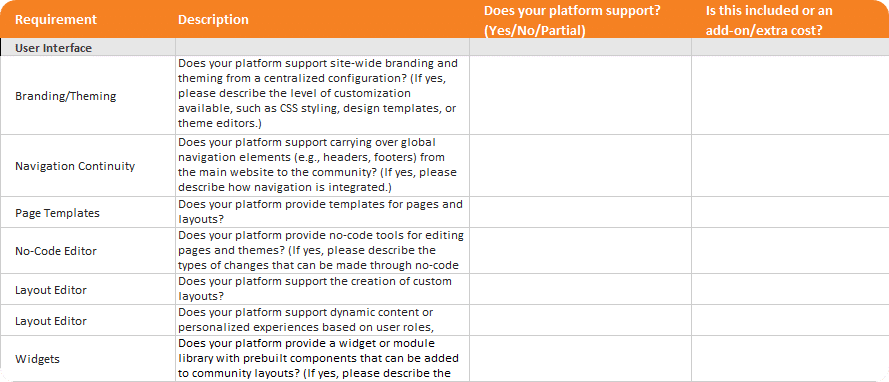
Resource: Community Software RFP Template
A structured RFP process helps you compare platforms on equal footing. This template provides 100+ questions spanning migration, integrations, analytics, moderation, and member experience. Use it to evaluate vendors consistently and document how each aligns with your requirements.
Download the RFP TemplateStage 3: Early-Stage Migration
Once you’ve chosen a new platform, the focus shifts to preparing members and staff. Create FAQs, visual guides, and teaser campaigns for your members. Internally, establish champions across departments, share training and tools, and ensure moderators and staff are confident in new workflows.
On the technical side, you’ll work with your current community vendor to determine their specific data export policies, and initiate the first transfers to your new platform.
Key actions:
Transfer
- 1) Confirm data export policies with your current vendor.
- 2) Begin transferring data to the new platform, including a full database export.
Promote
- 3) Create materials (e.g. FAQs, visual guides, teaser campaigns) to educate members
and create excitement about the new platform. - 4) Provide internal teams with resources (e.g. migration FAQs, talking points, and
support scripts) so they can help customers with the transition. - 5) Align with marketing, product, and support teams on messaging and workflows.
- 6) Celebrate internal wins and contributions in your company channels.
- 7) Create a training plan for moderators on new moderation tools.
Stage 4: Mid-Stage Migration
Mid-migration involves finding and fixing technical risks before launch. A trial migration, often with a smaller member segment, provides a safe environment to identify issues. This early rollout is an opportunity to collect testimonials from your pilot participants, which you can use to build confidence and excitement among the wider community. Stay closely connected with your new community vendor’s migration team to answer questions quickly and keep the project moving forward.
Key actions:
Trial
- 1) Run a trial migration using your first data export with a small group of users who can beta test the new platform.
- 2) Collect feedback and testimonials from pilot participants.
- 3) Validate data has been transferred correctly and completely.
Plan
- 4) Determine needs for data clean-up, redirects, and URL consistency.
- 5) Identify blockers, especially ones tied to platform capabilities, security, or workflows.
- 6) Work with stakeholders (internal and vendor) to resolve gaps.
Stage 5: Late-Stage Migration
In this stage, everything comes together. Final data transfers take place with both old and new vendors, followed by data validation and pre-launch checks. Unexpected delays are common, so plan buffer time and stay coordinated with your new vendor to maintain momentum.
In the final weeks of migration, clear, member-focused communication about downtime and launch timelines helps build excitement rather than frustration.
Once the production environment is ready, flipping the switch on your domain makes the launch official.
Key actions:
Revise
- 1) Incorporate feedback from pilot program into final tweaks before the full rollout.
Validate
- 2) Coordinate with vendors to complete the final data export.
- 3) Validate data accuracy and confirm pre-launch configuration.
- 4) Upload final data export to new vendor, building in buffer time.
Communicate
- 5) Share a clear migration timeline with progress updates both internally and with
community members.
Stage 6: Post-Launch
Once you’ve launched, you’ll shift to outcomes and optimization. Measure results to validate your decision to migrate, demonstrate ROI, and secure continued investment. Not everything will perform the same way—you might see some metrics improve and others dip, which is normal. Establish feedback loops within your company and community, encouraging members to point out if something’s not working as expected or could be improved. Launch surveys or discussions focused on the new experience. This shows responsiveness and a long-term commitment to member needs.
Key actions:
Measure
- 1) Measure post-migration outcomes and compare them to your pre-migration benchmarks.
Listen
- 2) Launch a member survey or open feedback thread focused on the new experience.
- 3) Conduct listening sessions with super users, moderators, and advisory groups.
Revise
- 4) Track common pain points and publish improvements publicly where possible.
- 5) Reassess programming and engagement based on new behavioral patterns.
- 6) Sunset low-impact initiatives and double down on emerging member behaviors.
Celebrate
- 7) Highlight wins and positive user feedback internally to reinforce the value of migrating.
- 8) Report on ROI to validate your decision and secure ongoing investment.
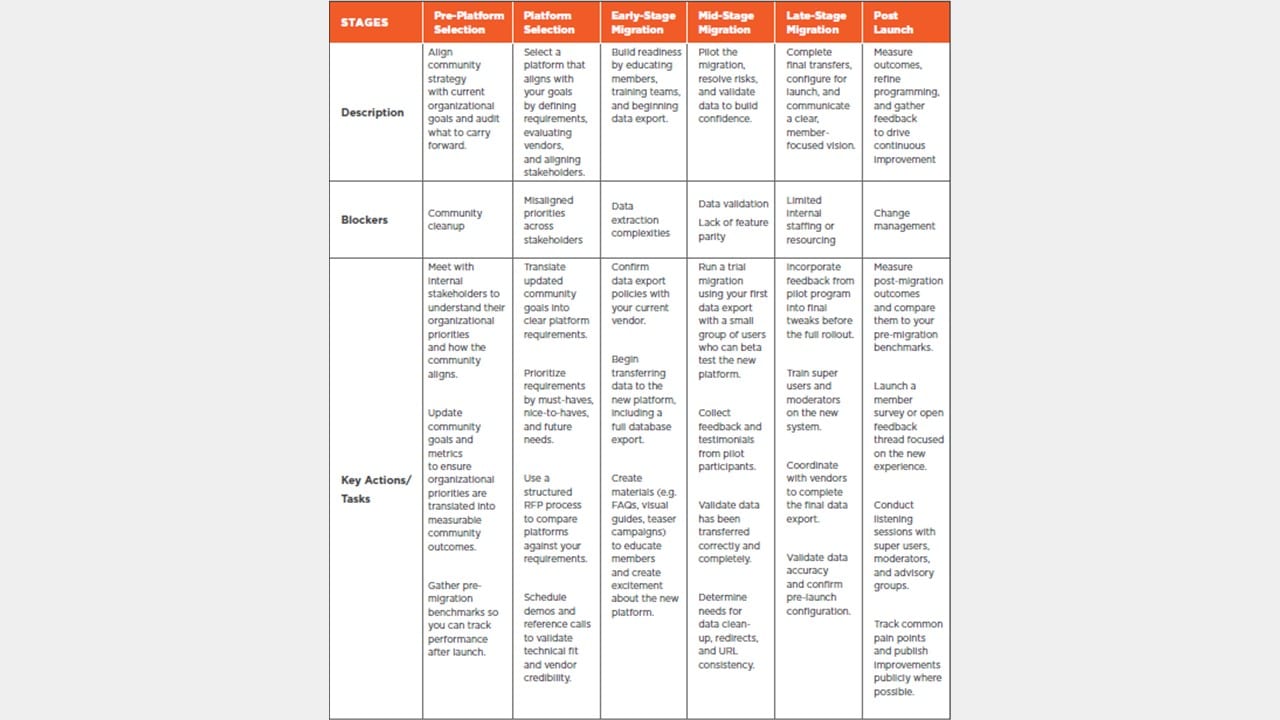
We’ve just walked through each stage of a community migration in detail. To see the full journey at a glance, you’ll find a summary table below. It captures every stage side-by-side so you can reference the whole process in one place.
Download the Full Migration Guide
Get the complete version of our migration framework in one downloadable PDF. Inside, you’ll find a detailed overview matrix that breaks down every stage, description, and key action.
Get the guideCommon Migration Challenges
Having migrated hundreds of online communities from many different platforms, we’ve seen the common pitfalls that bog customers down. Here are some of the most frequent challenges—and how to avoid them with the right preparation.
1. Data
Data is the trickiest part of a migration. Here are a few challenges you might face:
Data extraction complexities: Every platform has quirks in how exports work, such as limits on free exports, format differences, retention policies, or permissions that restrict access to certain fields.
- How to prepare: Ask about export policies and timing as early as possible, and share this information with your new vendor to prevent surprises or data loss.
Data structure differences: Exports don’t always map cleanly. For example, gamification data may be bundled in unexpected ways or buried across multiple files.
- How to prepare: Work with your future vendor on how they’ll map and validate data to ensure accuracy.
Field mapping is the process of aligning data fields between systems to make sure information transfers accurately and consistently. While its primary role is to preserve data integrity, it also tends to surface mismatches or gaps in the structure, which can be addressed before launch. At Higher Logic, we’ve made field mapping a core part of our migration process to catch these differences early and keep the final migration smooth.
Data cleanup: Migration often doubles as a cleanup effort, but this can create scope creep, last-minute changes, or confusion over what will (or won’t) be imported.
- How to prepare: Before any trial migrations, review and clean up categories and discussions in your legacy community to remove duplicates, archive outdated content, and ensure naming consistency. This helps keep the migrated data organized, reduces clutter, and improves the accuracy of migration mapping. If cleanup cannot be completed beforehand, develop a clear plan for restructuring after the final migration but before launch.
Data validation: Data doesn’t always transfer cleanly on the first attempt. Many migrations require trial runs to uncover mismatches, like archived posts being excluded from exports or custom profile fields failing to map correctly. These validation cycles are often necessary but can be time-consuming, and teams frequently underestimate the impact on timelines.
- How to prepare: Plan for at least some iteration. Build in buffer time, set expectations early, and leave space to collect and address feedback after each pass so delays don’t pile up.
Worried about a migration’s impact on web traffic? Higher Logic minimizes the risk of traffic loss during a migration by using a robust redirect strategy. Redirects ensure that old community URLs— whether linked from search engines, bookmarks, or other sites—seamlessly forward to their new equivalents in Higher Logic. This prevents broken links, preserves SEO value, and provides a smooth experience for end users.
2. Lack of Feature Parity
No new platform will match your old one feature-for-feature. Some losses are inevitable, which can create resistance among staff or members.
- How to prepare: Engage stakeholders in User Acceptance Testing (UAT) to surface gaps or friction points early, so you can fix what’s fixable and message proactively around what isn’t.
3. Limited Internal Staffing or Resourcing
Migrations take time from both the community and technical teams. If resourcing is tight for your tech team, critical elements like SSO or integrations may cause delays.
- How to prepare: Delays may be unavoidable, but involving tech teams early raises awareness and helps minimize impact.
4. Change Management
Migrating to a new platform inherently changes the member experience, and these changes can cause frustration. For example, members might have trouble logging in or with new functionality.
- How to prepare: Communicate early and often—via FAQs, guides, visual teasers, or listening sessions—to reduce confusion and create goodwill. Provide clear support pathways for members.
Ready, Set, Migrate
Changing platforms is one of the few moments where every part of your community comes under review. It’s a forced reset; the kind you don’t often get once a community is up and running.
While the work is demanding, it creates the chance to clear away what no longer serves members, sharpen alignment with organizational goals, and reintroduce the community internally with a stronger story. When handled thoughtfully, the migration process builds momentum and trust, setting the stage for a program that’s more resilient and strategically valuable than before.
Why Choose Higher Logic?
With experience migrating communities for Fortune 500 companies to nonprofit organizations, we bring unmatched expertise. Our team has migrated a wide range of platforms, including:
- Khoros/Lithium
- Gainsight/Insided
- Salesforce
- GetSatisfaction
- Jive
- phpBB
- bbPress
- vBulletin
- Invision Power (IPB)
- Simple Press
- Simple Machines (SMF)
If you’re considering a move, we can help you navigate the process with confidence and clarity, whether you want to understand what’s possible, dig into the technical details, or just explore what a migration could look like for your community.
Learn more about Higher Logic’s migration process or reach out to start the conversation.
While the work is demanding, it creates the chance to clear away what no longer serves members, sharpen alignment with organizational goals, and reintroduce the community internally with a stronger story. When handled thoughtfully, the migration process builds momentum and trust, setting the stage for a program that’s more resilient and strategically valuable than before.